
Whether it is pet food, furniture, stickers, clothes, home appliances, or gadgets, Shopee has built its reputation as a one-stop shop that is accessible straight from a phone. The question Huawei users usually ask is whether that experience extends to their devices, given that Huawei phones run without Google Mobile Services. The answer is yes — and the route is official. Shopee can be downloaded on any Huawei device through AppGallery, and the walkthrough for Huawei Shopee published on the HUAWEI Community lays out exactly how.
Shopping Comes First, So Does the Right Store
Part of Shopee’s appeal is convenience: buying things without going outside, with everything from home appliances to random little finds delivered to the door. None of that works without the app itself, which is why the first task on a new Huawei phone is getting Shopee from the right place. Huawei operates its own app store for exactly this purpose, and it is already on the phone when you unbox it.
The Three-Step Download
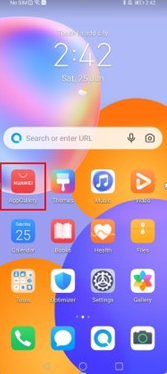
The official guide describes the installation as three easy steps. First, go to AppGallery on your home screen. Second, type in SHOPEE on the search bar and click INSTALL, then wait for it to install. Third, tap the OPEN button on the app and you are ready to go. The whole sequence takes place inside Huawei’s official store — the search, the download, and the installation — which is what makes it the safe route for Huawei Shopee access on devices without Google services.
See also: Life Coaching Services for Personal Growth and Fulfillment
What Happens After Open
Once the app opens, the marketplace behaves as it does anywhere else. Listings can be browsed by category, searches can be narrowed down, and checkout runs inside the app. Nothing about the shopping experience requires extra configuration — the install from AppGallery is complete in itself, which is why the official guide ends its instructions right there, with a simple “happy shopping.”
Where to Turn for Help
If anything along the way raises questions, the HUAWEI Community is the place to look: it hosts the step-by-step tutorial for Huawei Shopee alongside tutorials for other popular apps, and Huawei customer support is available for anything beyond the ordinary path. Download the app from AppGallery, open it, and the one-stop shop is ready on your Huawei device.